::: Linux MultiMedia Studio (LMMS). LMMS is a free cross-platform alternative to commercial programs like FL Studio, which allow you to produce music with your computer. This includes the creation of melodies and beats, the synthesis and mixing of sounds, and arranging of samples. You can have fun with your MIDI-keyboard and much more; all in a user-friendly and modern interface. : ;

Menu

»

Home

Linux MultiMedia Studio (LMMS)


Linux MultiMedia Studio (LMMS) has been updated to version 0.4.11 for both Windows and Linux.
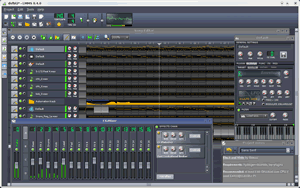
Linux MultiMedia Studio (LMMS) a free cross-platform alternative to produce music with your computer

Linux MultiMedia Studio (LMMS) has been updated to version 0.4.11 for both Windows and Linux.

Summary of changes for version 0.4.11

Core:

  • AudioPulseAudio: do not initialize volume.

GUI:

  • SongEditor: made smooth scrolling an optional feature.

  • Ask whether to recover session after unexpected exit.

Plugins:

  • CAPS: updated to version 0.4.5.

  • CALF: updated up to commit b22ca910642433a4507f33ec08bcbf8e6d02e3ff.

  • CALF/Monosynth: only set frequency-related values in params_changed if not.

Misc:

  • Win32/Win64 builds built with updated MinGW64 runtime and GCC and shipping with updated versions of PortAudio, Qt.

More detailed changes can be obtained here. The download is available here.


LMMS is a free cross-platform alternative to commercial programs like FL Studio, which allow you to produce music with your computer. This includes the creation of melodies and beats, the synthesis and mixing of sounds, and arranging of samples. You can have fun with your MIDI-keyboard and much more; all in a user-friendly and modern interface.

Features:

  • Song-Editor for composing songs.

  • A Beat+Bassline-Editor for creating beats and basslines.

  • An easy-to-use Piano-Roll for editing patterns and melodies.

  • An FX mixer with 64 FX channels and arbitrary number of effects allow unlimited mixing possibilities.

  • Many powerful instrument and effect-plugins out of the box.

  • Full user-defined track-based automation and computer-controlled automation sources.

  • Compatible with many standards such as SoundFont2, VST(i), LADSPA, GUS Patches and full MIDI support.

  • Import of MIDI and FLP (Fruityloops Project) files.



The Event List view shows events in a list format. You can insert, delete, or modify any kind of event, including notes, pitch-wheel data, velocity, MIDI controllers, patch changes, Wave files, lyrics, text strings, MCI commands, System Exclusive meta-events, and more. There are three ways to open the Event List view:  Select one or more tracks and choose View-Event List -- Select one or more tracks and click  in the Views toolbar  -- Right-click a clip in the Clips pane and choose View-Event List from the popup menu  -- The events in the selected tracks are listed one per line, from top to bottom. As you move the highlight through the event list, SONAR updates the Now marker (time display). During playback, the event list scrolls to display the events at the current time. The current event is centered in the Event List during playback, and the highlight is on the correct event when playback stops. Any time you change the Now time, the event list is updated and the highlight is moved to the event that will be played next.  When the Event List view includes more than one track, events are mixed together in chronological order. For example, if you select tracks 1 and 3 when you open the Event List view, you see a single list of intermingled events from tracks 1 and 3. You can have any number of Event List views, each containing any number of tracks, open at the same time. You can change the tracks shown in the Event List view by clicking the  button and choosing the tracks you want.

VST is a trademark of Steinberg Soft- und Hardware GmbH


 Syntheway Virtual Musical Instruments © 2004-2012 Daniel Alberto Laiseca| Buenos Aires - Argentina|

Privacy Policy | Disclaimer | FAQ | Site Map Artists & Links Technical Support ContactAbout Us







