ExperimentalScene DarkWave
Studio

ExperimentalScene has updated
DarkWave Studio
to version 3.8.3.
Changes in v3.8.3:
-
Fixed problems with VST
Plug-ins with a non-unique UniqueID by loading of correct machine by
comparing plug-in name when loading a project. The project file format has
changed to support this and so older versions of DarkWave Studio will not be
able to load projects saved by this version.
-
Fixed playing of notes with the
mouse with the Pattern Editor not responding to quick successive clicks.
-
Fixed a bug in the WaveOut
Driver of the 64 bit version which may have caused crashes or inability to
play audio output on some systems.
New in v3.8.2:
Changes in v3.8.1:
-
Fixed Add Machine VST Menu bug
causing garbage display of VSTs not arranged in subfolders.
-
Add Machine Menu sorting made
case insensitive.
-
Added support for MIDIKeyName
in Pattern Editor and VST Adapter.
Previous Update:
ExperimentalScene has updated
DarkWave Studio to v3.7.8.
Changes since v3.7.2:
-
Fixed a bug where ES
Arpeggiator would not initialize correctly and not generate notes.
-
Fixed ES Arpeggiator timing
bug.
-
Made studio area and scroll
bars update when activating a machine's GUI.
-
Icon for VST Machines and VST
path options changed to VST logo.
-
Fixed toolbar borders not
drawing on window resize.
-
Changed text color of some
controls.
-
Adjusted edit text borders.
-
Fixed a bug causing a crash
when editing audio output options when ASIO support is enabled (the default)
and no ASIO drivers present.
-
Updated compiler from GCC
v4.5.2 to v4.6.1.
-
Fixed a bug causing a crash
when loading the ES HD Recorder Track Machine when the DarkWave Studio
window is small.
-
Modified waveform display of
bundled native plug-ins 'ES Crunch' and 'ES Distort' for better visibility.
ExperimentalScene has updated
DarkWave Studio to
v3.7.1.
Changes since v3.6.9:
-
Fixed a bug in ES Basshead
(polyphonic) which would sometimes cause notes to sustain after a note off
control message and keep playing.
-
Fixed bug in Pattern Editor
where deleting a machine with more than one pattern would leave patterns in
memory and cause the program to crash while saving the project and write a
corrupt project file.
ExperimentalScene has updated
DarkWave Studio to
version 3.6.9.
Changes in v3.6.9:
Changes in v3.6.8:
-
ES BassHead: Setting LFO Amp 1
would also set LFO Amp 2, 3 and Send 1. Setting LFO Amp 2 would also set LFO
Amp 3 and Send 1. Setting LFO Amp 3 would also set LFO Send 1. Fixed.
-
ES BassHead: Setting LFO Amount
for Send 1 and 2 (not 3) of any LFO would set latter send amounts to the
changed value. Fixed.
-
Removed DarkWave Studio's
dependency on DirectSound library.
Changes in v3.6.7:
Recent Updates:
ExperimentalScene has updated
DarkWave Studio to
version 3.6.6.
Changes since v3.6.4:
-
3.6.6: Improved ASIO output
support compatibility, in particular detection and selection of supported
sample rates.
-
3.6.5: Added a new bundled
machine called ES StereoJoiner which joins two mono input left and right
signals into a stereo signal.
ExperimentalScene has updated
DarkWave
Studio to version 3.6.4.
Changes:
-
v3.6.4: Added a new bundled
machine called ES StereoSplitter which splits a stereo signal into left and
right mono signals. A sample project titled "StereoSplitter" is included to
demonstrate the plugin.
-
v3.6.3:
Fixed bug in VST Adapter which caused a crash when changing audio output
latency settings with a VST with single precision audio input or output.
-
v3.6.2: Updated installer
integrated OpenCandy.
Changes since v3.5.7:
-
Added a new bundled bit reducer plugin called ES Crunch.
It allows you to reduce the number of bits per sample from 16 to 1 bits. A
sample project titled "Crunch" is included to demonstrate the
plugin.
-
Fixed some bugs with saving and loading projects which could lead to
project file corruption and crash DarkWave Studio.
-
Added a new bundled distortion plugin called ES Distort.
A sample project titled "DrumDistort" is included to show it in
action.
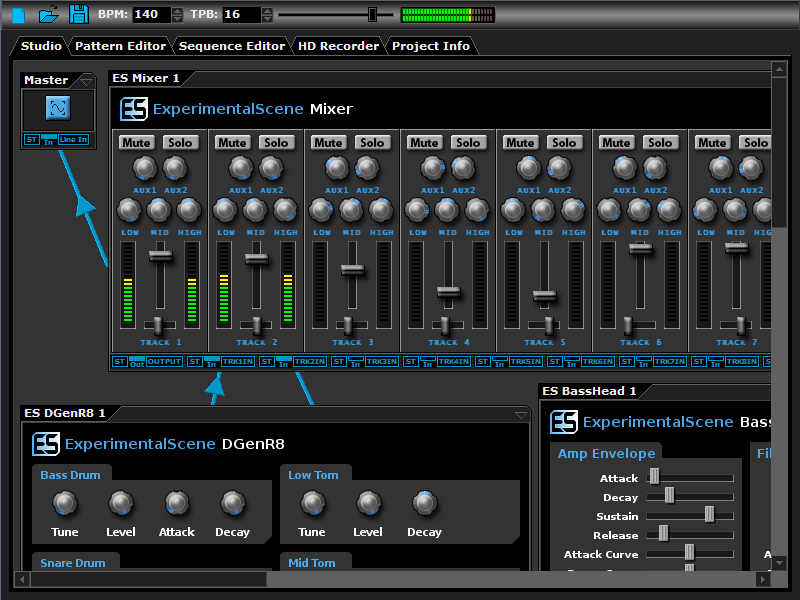
DarkWave Studio is a modular
virtual studio for the creation of electronic music. With DarkWave Studio you
can easily use the included audio machines and third party VST effects and
instruments to create music. DarkWave Studio allows the connection of machines
in an ad-hoc cabling fashion. DarkWave Studio comes with both native versions
for 32-bit and 64-bit editions of Windows, although you may use the 32-bit
version on all editions of Windows for backwards compatibility with 32-bit VST
plug ins.
DarkWave consists of the following main parts:
-
Studio (Work With Machines).
-
Pattern Editor (Create Pieces Of Music).
-
Sequencer (Arrange Patterns Into A Song).
-
Multi-track Hard Disk Recorder (Master Your Music).
-
Native x64 and x86 Windows Platform Support.
-
VST PlugIn Support - Limitlessly Expandable With Instrument and Effects
PlugIns.
-
ASIO Audio Driver Support - Low Latency Output.
-
Multi Core / Multi CPU Support.
-
Full 64-bit Double Precision Floating Point Audio Processing.
The following plugins are included with DarkWave:
-
MIDI Input (Use MIDI Keyboards With DarkWave Instruments).
-
ES Arpeggiator - For Easily Playing Complicated Arpeggios With A MIDI
Keyboard.
-
ES ControlChange Mapper - Map Control Change Events From One Index To
Another.
-
ES MIDI Input - Play Instruments From A Music Keyboard.
-
ES MIDI Output - Sequence External MIDI Synthesizers.
-
ES Mixer - 8 Track Stereo Mixer With 2 Auxilary Tracks.
-
ES DGenR8 - Synthesize Drum Beats With Roland TR-909 Flavour.
-
ES BassHead - Top Notch Virtual Analog Subtractive Synthesizer.
-
ES SpatialVerb - Realistic Reverb Effects With The Smoothest Sound.
-
ES Stomp - Synthesize That Classic Techno Thumping Kick Drum.
-
ES AntiAlias - 32x Digital Oversampling Filter.
-
ES QuadDelay - For Trippy Echo Effects.

|