RetroMagix Virtual Harpsichord VST VST3 and Audio Unit Plugin: Classical,
Neoclassical and Modern Styles for Windows and Mac (Universal 2: Apple silicon
M1/M2/M3 and Intel)
RetroMagix is a virtual
harpsichord based on the Flemish (Belgian-Dutch), French, German and Italian
models, designed to create a wide range of sounds. Suitable for Renaissance,
Baroque and Classical music, as well as contemporary harpsichord, neoclassical
and fusion styles.
Available as VST and VST3 plug-ins
for Windows 64-bit, and as Audio Unit, VST and VST3 plug-ins for macOS, in
native Apple silicon mode (Universal 2 binary), with support for both 64-bit
Intel and Apple (M1, M2, M3) processors.
Features
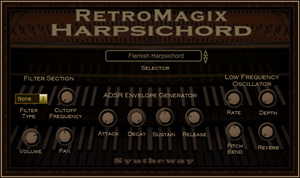
• Quick selector for switching between different preset sounds:
#
List of Preset Sounds / Demo
↓
1
Flemish Harpsichord
2
French Harpsichord
3
German Harpsichord
4
Italian Harpsichord
5
Coupled Harpsichord
6
Upper Harpsichord
7
Electric Harpsichord
8
Hybrid Harpsichord
9
ClaviHarpsichord Synth
• Low-Frequency Oscillator Controls: These knobs apply LFO modulation to the
selected instrument. By using the LFO to modulate various aspects of the
audio signal, you can apply effects such as vibrato or tremolo.
Ø Rate:
This knob controls the frequency. Turn clockwise for a faster
modulation rate. Ø Depth:
This knob controls the amplitude. With a lower setting, the
resulting modulation is subtle, while a higher depth will result
in a much more extreme effect.
•
ADSR envelope generator with Attack, Sustain, Decay and Release parameters:
Ø Attack
determines the time it takes for the note to get to the maximum level. Ø Decay
determines the time it takes for the note to go from the maximum level
to the sustain level (controlled by Sustain). Ø Sustain
determines the level of the sound is played at while the note is held (after
the other envelope states, Attack and Decay, have been completed). Ø Release
determines the time it takes for the note to fall from the sustain level
to zero (silence) level when it is released.
• Pitch Bend: The Pitch Bend knob directly changes the pitch of the selected
instrument.
Ø Pitch
Bend center position: is normal pitch. Ø Pitch
Bend down: Specifies the amount of pitch change that will occur when the
pitch bend/modulation lever is moved to the left. Ø Pitch
Bend up: Specifies the amount of pitch change that will occur when the
pitch bend/modulation lever is moved the right.
• Reverb built-in: provides a spaciousness and depth to simulate the
sound reflections from walls, floors and ceilings following a sound created
in an acoustically reflective environment. Small rooms can be modeled as
well as large spaces.
• Filter Type. Combo box to switch between the following options:
Ø Low
Pass (LPF): a filter that passes signals with a frequency lower than a
certain cutoff frequency and attenuates signals with frequencies higher
than the cutoff frequency. Ø High
Pass (HPF): a filter that passes signals with a frequency higher than a
certain cutoff frequency and attenuates signals with frequencies lower
than the cutoff frequency. Ø None:
No filter is applied. Ø Cutoff
Frequency Filter: Sets the cutoff frequency for the low pass and high
pass filters.
• Volume: Adjusts the volume of the instrument.
• Panning potentiometer control: Set the panning of the instrument. Adjusts
the stereo pan position of the signal output, which determines how much of
signal is sent to the left and right channels.
Before installing any VST, VST3 or Audio
Units plug-ins, please make sure your computer meets the
following requirements. Please test the
demo version of this
product
extensively on your host to make sure there are no
problems before
purchasing.
Windows operating system: Windows 11, Windows 10, Windows 8,
Windows 8.1, Windows 7 64 bit.
VST and/or VST3 compatible host / digital audio
workstation DAW / MIDI sequencer 64-bit: This VST/VST3 software can be
"plugged" into any host application that supports VST/VST3 technology,
such as Image-Line FL Studio, Steinberg Cubase Pro, Artist and Elements,
Cakewalk by BandLab, Ableton Live, Cockos REAPER, PreSonus Studio One,
Acoustica Mixcraft, MAGIX Acid Pro, MakeMusic Finale, Avid Sibelius,
Mackie Tracktion, Steinberg Nuendo, Magix Samplitude, Magix Music Maker,
Cantabile (Lite, Solo, Performer), n-Track Studio, VSTHost, DarkWave
Studio, Bitwig, SAVIHost and many more.
MIDI controller device: A MIDI controller is required to play
this VST instrument. The most common device in this class is a keyboard
controller. After launching Digital Audio Workstation or your MIDI host
application, be sure to select the appropriate MIDI device before
attempting to play your MIDI controller.
An ASIO® sound card is recommended for low latency real-time
performance.
Operating system: macOS Sierra, macOS High Sierra,
macOS Mojave, macOS Catalina, macOS Big Sur, macOS Monterey, macOS Ventura, macOS Sonoma.
These plug-ins have been compiled using Universal
2 application binaries for both Intel and Apple silicon (M1, M2, M3) to run
on both Intel x86-64 and ARM64-based Macintosh computers, taking
advantage of the native power and performance of the new Apple
silicon-based Macs, while continuing to support Intel-based Macs. In all cases, we always recommend that you try
the free trial version of the software.
The Audio Unit Component, VST and VST3 plug-ins
require of a compatible host, digital audio workstation (DAW) or MIDI
sequencer that supports Audio Units, VST or VST3 technology. They can be
‘plugged in’ to process audio from applications such as Logic Pro,
GarageBand, MainStage, Cubase, Ableton Live, REAPER, Studio One
Professional, Ardour, and Digital Performer, among others.
MIDI controller device: A MIDI controller is
required to play this plug-in instrument. The most common type of device in
this class is a keyboard controller. After launching the Digital Audio
Workstation or your MIDI host application, be sure to select the appropriate
MIDI device before attempting to play your MIDI controller.
Alternatively, the
EXS24 and
KONTAKT
sample libraries are available in .exs and .nki format, respectively.
Limitations of
the Unregistered/Demo Version:
The AU, VST2 and VST3 plugins DEMO versions are only
intended to give you a taste of what is possible with this plugin in a
limited range of one octave with random 'white noise'. For full information on the MIDI key range available, please refer
to the pdf file entitled 'Comparison Chart for Limitations of the Demo
Version'.
The full version can be purchased as downloadable software
for
US$ 49.90.
Please note that we do not offer refunds. To determine if
the software meets your requirements before purchasing, we encourage you to
try the free
demo
of the software plugin and read our licence.
VST™
is a trademark of Steinberg Soft- und Hardware GmbH