|
|
| 
|
|
Free Download
Instruments & Effects:
VST,
VST3, Audio Unit Demos (Win/Mac)
|
|
|

Virtual Choir,
Acoustic, Semi Hollow Body and Electric Guitars, Orchestral &
Ethnic Woodwinds,
Brass Trumpet, Trombone, Tuba, French Horn, Flugelhorn, Cornet,
Harpsichord,
Harp and
Dulcimer,
Sitar and Tanpura,
Banjo, Mandolin, Mandocello, Mandola, Banjolin,
String Ensembles + Solo Violin, Viola,
Cello and Contrabass,
Acoustic, Electric and Synth Basses,
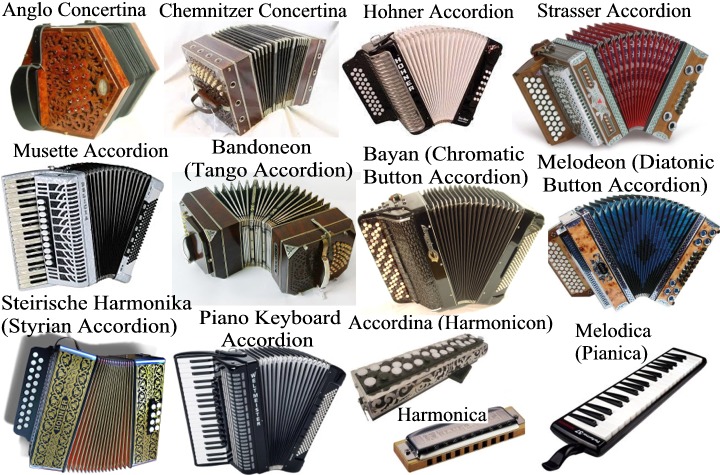
Accordions, Bandoneon, Melodica and Harmonica,
Hammond B3 Organ,
Antique, Classic, Vintage and Modern Organs,
70s/80s Synthesizer Keys, Leads, Pads, Basses, Atmos,
Synth Leads, Pads, Keys, Atmos Textures,
Ambient Soundscapes,
Phase Distortion Synthesizer,
Subtractive Synthesizer,
FM (Frequency Modulation) Synthesizer,
Pattern-Based Step Sequencer,
Koto and Shamisen,
Acoustic Grand Pianos,
Electric
Pianos, SoundFont SF2 Player 64 bit and
Soprano, Alto,
Tenor and Baritone Saxophones
 
LIMITATIONS
of the UNREGISTERED/DEMO VERSION:
 Be aware that certain sounds may not be available in some
plugin or may have a
reduced key-range (see details in
each product's page).
Be aware that certain sounds may not be available in some
plugin or may have a
reduced key-range (see details in
each product's page).
It generates a beep/white noise in all output
channels.
The
Registered Version does not have nagging sounds, contains full keyrange and all preset sounds and their use is unlimited.
Our
products are offered at the lowest cost possible to
ensure affordable solutions for everyone. Be a part of this community and
register
your version at our site. No dongles, no lengthy purchase process, no hassle.
IMPORTANT:
Please be aware that we do not offer refunds. To determine whether the software
meets your requirements prior to purchase, we encourage you to test the free
demo of the software.

Before installing any VST, VST3 or Audio
Units plug-ins, please make sure your computer meets the
following requirements. Please test the
demo version of this
product
extensively on your host to make sure there are no
problems before
purchasing.

-
Windows operating system: Windows 11, Windows 10, Windows 8,
Windows 8.1, Windows 7 64 bit.
-
VST and/or VST3 compatible host / digital audio
workstation DAW / MIDI sequencer 64-bit: This VST/VST3 software can be
"plugged" into any host application that supports VST/VST3 technology,
such as Image-Line FL Studio, Steinberg Cubase Pro, Artist and Elements,
Cakewalk by BandLab, Ableton Live, Cockos REAPER, PreSonus Studio One,
Acoustica Mixcraft, MAGIX Acid Pro, MakeMusic Finale, Avid Sibelius,
Mackie Tracktion, Steinberg Nuendo, Magix Samplitude, Magix Music Maker,
Cantabile (Lite, Solo, Performer), n-Track Studio, VSTHost, DarkWave
Studio, Bitwig, SAVIHost and many more.
-
MIDI controller device: A MIDI controller is required to play
this VST instrument. The most common device in this class is a keyboard
controller. After launching Digital Audio Workstation or your MIDI host
application, be sure to select the appropriate MIDI device before
attempting to play your MIDI controller.
An ASIO® sound card is recommended for low latency real-time
performance.

-
Operating system: macOS Sierra, macOS High Sierra,
macOS Mojave, macOS Catalina, macOS Big Sur, macOS
Monterey, macOS Ventura, macOS Sonoma, macOS Sequoia,
macOS Tahoe.
-
These plug-ins have been compiled using Universal
2 application binaries for both Intel and Apple silicon
(M1, M2, M3, M4, M5) to run on both Intel x86-64 and
ARM64-based Macintosh computers, taking advantage of the
native power and performance of the new Apple
silicon-based Macs, while continuing to support
Intel-based Macs. In all cases, we always recommend that
you try the free trial version of the software.
-
The Audio Unit Component, VST and VST3 plug-ins
require of a compatible host, digital audio workstation
(DAW) or MIDI sequencer that supports Audio Units, VST
or VST3 technology. They can be ‘plugged in’ to process
audio from applications such as Logic Pro, GarageBand,
MainStage, Cubase, Ableton Live, REAPER, Studio One
Professional, Ardour, and Digital Performer, among
others.
-
MIDI controller device: A MIDI controller is
required to play this plug-in instrument. The most
common type of device in this class is a keyboard
controller. After launching the Digital Audio
Workstation or your MIDI host application, be sure to
select the appropriate MIDI device before attempting to
play your MIDI controller.
     



VST™
is a trademark of Steinberg Soft- und Hardware GmbH
Audio Units™ is a trademark of Apple
Inc.
|
|
| |
|