|
|
| 
|
|
Harrison
Consoles Mixbus for
Windows
-
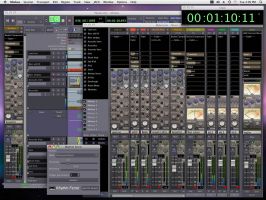
Harrison Consoles has released a Windows version of its
Mixbus
DAW software.
Mixbus is a full-featured Digital Audio
Workstation (DAW) with "True Analog Mixing" : a
combination of Harrison's world-renowned sound and
features in an affordable, knob-per-function interface.
Mixbus provides professional-level features to import or
record an unlimited number of audio tracks to your
computer, edit them, and mix them together. You can use
Mixbus to record your band, mix a record, make a podcast,
or edit the audio for your video.
Mixbus
Features:
-
Straightforward “knob per function” mixer layout based
on Harrison's renowned 32-series and MR-series music
consoles.
-
DSP sounds
based on Harrison's world-renowned analog and digital
mixing console experience.
-
Precision
algorithms for EQ, Filter, Compression, Analog Tape
Saturation, and Summing.
-
Unlimited
stereo or mono input channels, each with unlimited
plugins, sends, and hardware inserts. (limited only by
CPU speed).
-
Phase,
Input trim, High-pass Filter, Sweepable 3-band EQ,
Compression, and 8 Mix Bus sends on every track.
-
8 Stereo
Mix Buses featuring Tone controls, Compression,
Sidechaining, and Analog Tape Saturation.
-
Stereo
Master Bus that features Tone controls, Analog Tape
Saturation, K-meter, Stereo Correlation Meter, and
Limiter.
-
Automatic
plugin delay compensation to support effects such as
parallel compression without time misalignment.
-
Comprehensive "at-a-glance" metering with peak, peak
hold, and compressor gain reduction visible on every
track and bus.
-
Extensive
DAW features via the Ardour Digital Audio Workstation,
refined by Harrison engineers to be smooth and stable.
Mixbus
is a customized version of
Ardour
- a collaboration between Harrison, manufacturer of analog and
digital consoles, and Paul Davis, lead developer of Ardour.
Mixbus
enhances Ardour by providing critical mixing functions in a
knob-per-function interface called "True Analog
Mixing". True Analog Mixing is based on Harrison's
renowned 32-Series and MR-Series console designs, combined
with Harrison's proprietary digital mixing technology. Mixbus
enables the user to record, edit, and mix a musical
performance "in the box" while achieving a sound
that harkens back to the golden age of album recordings.
Traditional
DAW mixers were designed by companies with no pedigree in
music mixing, and they suffer from well-known flaws, according
to Harrison. Harrison says it eliminated these flaws in Mixbus
by completely replacing the DAW's internal mixing engine and
applying proprietary True Analog processing. Harrison consoles
are known for their great-sounding EQ, filters, dynamics, and
bus summing on every track. Now Mixbus offers every engineer a
real Harrison music console "in the box".
Mixbus
Features:
-
Straightforward
"knob per function" mixer layout based on
Harrison's renowned 32-series and MR-series music
consoles.
-
Precision
DSP algorithms for EQ, Filter, Compression, Analog Tape
Saturation, and Summing based on Harrison's world-renowned
large format analog and digital mixing consoles.
-
Unlimited
stereo or mono input channels (based on available CPU
power) featuring High-pass Filter, EQ, Compression, and 4
Mix Bus sends on every channel.
-
4
Stereo Mix Buses (can be used for groups or auxes)
featuring Tone controls, Compression, Sidechaining, and
Analog Tape Saturation.
-
Stereo
Master Bus that features Tone controls, Analog Tape
Saturation, K-meter, and Limiting to help you make
polished mixes.
-
Plugin
delay compensation to support effects such as parallel
compression.
-
Comprehensive
"at-a-glance" metering with peak, peak hold, and
compressor gain reduction visible on every track and bus.
-
Extensive
DAW features via the Ardour Digital Audio Workstation.
-
Supports
AudioUnit plugins and any CoreAudio interface.
| | |











