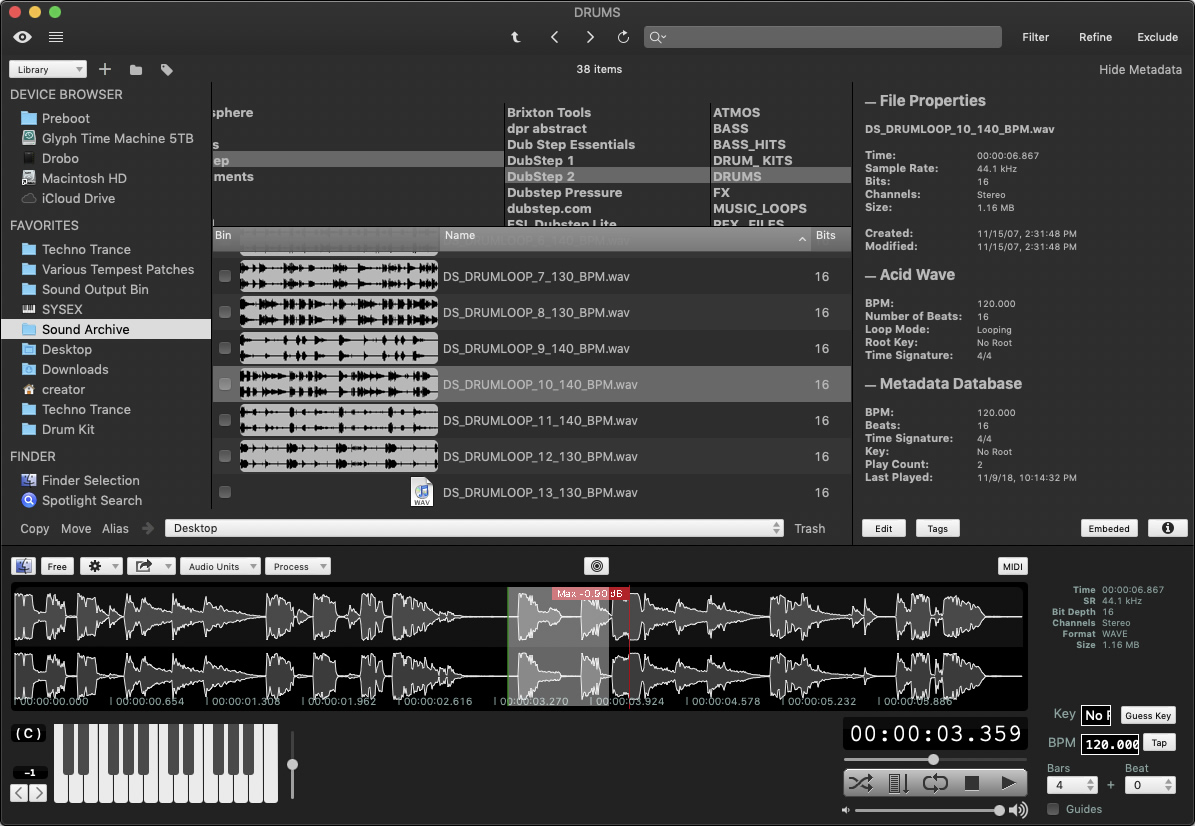
::: AudioFinder is an advanced sample management system for MacOS X complete with full AudioUnit support. : ;

Menu

»

Home

Iced Audio AudioFinder  5.5.2


Iced Audio AudioFinder 5.4.4

  • Iced Audio has updated AudioFinder to version 5.5.3.

    Changes:

    • Added new Metadata Database Relink routine to speed up repairing a mixed up Metadata Database.

    • Added Convert to CAF feature.

    • Added Save As CAF to the Sample Tool.

    • Other bug fixes.

    Changes in version 5.5.2:

    • Added a Metronome Utility Panel.

    • Enhanced the Metadata Database Manager and added a reset the database feature.

    • Added warning alerts for Group, Copy, Move, Alias and Move to Trash.

    • Renamed the menu item “Group In New Folder” to “New Folder with Selection (n Items)” to match the new feature in OSX Lion.

    • Bug fix when using Power Rename in combination with selecting Tags from the Sidebar.

    • Bug fix the preference “Scan/Import Sidebar items require double clicks” was broken.

    • Other bug fixes.

    Changes in version 5.5.0:

    • Added new Tag based browser.

    • Added a “Clear” button to the Tags editor.

    • Added a “Append” option to the Tags editor for multiple selections.

    • Moved the Star Rating control to the Tags editor panel where it doesn’t require saving.

    • Bug fix for path control when Bookmarks are selected in the Sidebar.

    • Fixed list refresh bug when changing tags.

    • Other bug fixes.

    Changes in version 5.4.5

    • Added new tagging panel to make setting tags on sounds quicker and easier.

    • Bug fix reading certain AIFC files.

    • Other bug fixes.

    Changes in version 5.4.4

    • A collection of fixes to make AudioFinder on Lion smoother.

    • Bug Fixed a potential freeze after a scan or import on Lion.

    • Lion double clicking Sidebar bug Fixed.

    • Switched to GCD for threads for better performance.

    • Renamed saved “Libraries” to “Lists” to avoid confusion with everything else called Library.

    • Behavior change, if the Preference “Allow unlimited Miniview files” is enabled Audio will keep these files in a non-system purgable location instead of the default Caches folder.

    Changes in version 5.4.3

    • Improved 64 bit stability.

    • Fixed memory leak.

    • Other bug fixes.

    Changes in version 5.4.2

    • Fixed a crasher when playing back files on certain systems.

    • Improved 64 bit stability.

    • Better caching memory management.

    • Other bug fixes.

    Changes in version 5.4.1

    • Added a new path control for quick jumping.

    • Added search term “bread crumbs” for tracking refinement of search terms.

    • Added “Refine” button to the Metadata Database Search and Spotlight Search.

    • Added a crash reporting feature.

    • Bug Fix: Renaming a folder in the list view didn’t update folder column browser.

    • Bug Fix: Varispeed menu was disabled for some mp3 files.

    • Bug Fix: 64 bit only crash when trying to play.ogg files.

    • Bug Fix: some menu items were disabled.

    • Other bug fixes.


AudioFinder is an advanced sample management system for MacOS X complete with full AudioUnit support.

Features:

  • Intuitive Design and Easy to Learn.

  • Audio CD Sample Extractor.

  • Full AudioUnit Plugin Support (processing and playback).

  • AudioUnit Presets menu.

  • Plug-In Manager.

  • Batch Processing.

  • Create EXS Instruments with one click.

  • ToneFinder reference tone generator.

  • DelayFinder BPM/Note millisecond calculator.

  • Convert to main PCM formats.

  • Convert to any iTunes supported formats.

  • ReCycle playback.

  • Export REX as AIFF.

  • Waveform Overview with measure markers.

  • Max Peak detection and display.

  • Integration With Mac OS Finder (colors, comments and more...).

  • Drag and Drop support for quick playing.

  • Playback history (never loose track of sounds).

  • MIDI keyboard input.

  • Instant Sound Preview.

  • Instant Pitch Control With Mini-Keyboard.

  • Pitch Analyzer.

  • Loop BPM Detection With Auto-rename.

  • Scale loops to a specific BPM.

  • BPM Tap Pad.

  • Tuning Fork for finding pitches.

  • Fast Sound Scanning.

  • Scan Sets.

  • Advanced Sound Searching System.

  • Regular Expression searching.

  • Generate detailed reports for importing into spreadsheets and databases.

  • Power File Renaming.

  • Bookmarks and Navigation Tools.

  • Tools For Helper Applications.

  • Favorites Directory.

  • Autopilot Play with Shuffle Mode.

  • Play standard MIDI files through the build in DLS synth.

  • Sysex Transmission to manage MIDI Sysex data.

  • PCM File Format Conversion.

  • AudioFinder supports the AAC, MP3, AIFF, AIFC, WAV, SD2, REX, RX2, MIDI and SYX formats, the primary formats for all professional music software.

  • 32 Bit Floating Point DSP Utilities.

  • iPod support - can play and copy files from iPods.

  • CoreAudio, AudioUnit and CoreGraphics based.

  • G4 and G5 Optimized.

  • and more...


The Event List view shows events in a list format. You can insert, delete, or modify any kind of event, including notes, pitch-wheel data, velocity, MIDI controllers, patch changes, Wave files, lyrics, text strings, MCI commands, System Exclusive meta-events, and more. There are three ways to open the Event List view:  Select one or more tracks and choose View-Event List -- Select one or more tracks and click  in the Views toolbar  -- Right-click a clip in the Clips pane and choose View-Event List from the popup menu  -- The events in the selected tracks are listed one per line, from top to bottom. As you move the highlight through the event list, SONAR updates the Now marker (time display). During playback, the event list scrolls to display the events at the current time. The current event is centered in the Event List during playback, and the highlight is on the correct event when playback stops. Any time you change the Now time, the event list is updated and the highlight is moved to the event that will be played next.  When the Event List view includes more than one track, events are mixed together in chronological order. For example, if you select tracks 1 and 3 when you open the Event List view, you see a single list of intermingled events from tracks 1 and 3. You can have any number of Event List views, each containing any number of tracks, open at the same time. You can change the tracks shown in the Event List view by clicking the  button and choosing the tracks you want.

VST is a trademark of Steinberg Soft- und Hardware GmbH


 Syntheway Virtual Musical Instruments © 2004-2012 Daniel Alberto Laiseca| Buenos Aires - Argentina|

Privacy Policy | Disclaimer | FAQ | Site Map Artists & Links Technical Support ContactAbout Us