Bluaudio D8Bridge
MCU Emulator for D8B
MIDI DAW Remote
ControllerConsole Emulation
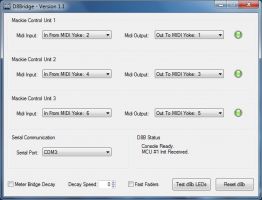
Bluaudio has released version 1.1 of
D8Bridge, software that
converts your old Mackie D8B digital mixer into a modern,
full-fledged DAW control surface.
D8Bridge communicates directly with your D8B mixer using
its "Console Data" port via a custom serial cable. When a user
touches a knob, a fader or a button, the software converts the
commands into a more modern universal control protocol. This
protocol is the "Mackie Control Universal" and it's compatible
with most DAW software available on the market.
The Mackie Control hardware units have 9 faders total, 8
channels plus one master fader. To be able to use all of the
D8B's 25 faders, they are emulating 3 complete units. It's
like having 3 MCUs in one big box.
Changes and Updates in version 1.1:
-
Fader routine/calculation redone for smoother operation
(and fixes fader jumps).
-
MCU init routine working now! (Fixed Cakewalk Sonar
Compatibility).
-
Pans are cleared out when D8B booting (might cause weird
pans and such).
-
Unmapped buttons now don't send "RecRdy Off" anymore.
-
A lot of minor cosmetic changes here and there.
-
Complete rewrite of the meter bridge routine (Faster, no
more flicker).
-
Added "Fast Faders" option (undocumented d8b feature!).
-
Added automatic launch of DAW software (just add your
DAW path in DAW.TXT).
-
Added Select Hold for automation write (disable
motors/fader touch emulation).
-
Added support for channel display / assignment (the 2
digits now is 100% MCU).
-
Changed the 5 seconds delay to a OK box in "Test Leds".
-
Added "MCU Init" LEDs state in main window.
-
Two "format" will be available for the application, 32
and 64bit.
What is D8Bridge?
The D8Bridge
software converts your old Mackie D8B digital mixer into a
modern, full-fledged DAW control surface. D8Bridge has been
developed over a period of two years by two Montreal based
programmers named Marc Girard and Fran�ois V�zina.
How does it work?
D8Bridge communicates directly with your D8B mixer using
its "Console Data" port via a custom serial cable. When a user
touches a knob, a fader or a button, the software converts the
commands into a more modern universal control protocol. This
protocol is the "Mackie Control Universal" and it's compatible
with most DAW software available on the market.
The Mackie Control hardware units have 9 faders total, 8
channels plus one master fader. To be able to use all of the
D8B's 25 faders, we are emulating 3 complete units. It's like
having 3 MCUs in one big box.
New in version 1.1
-
Fader routine/calculation redone for smoother operation
(and fixes fader jumps).
-
MCU init routine working now! (Fixed Cakewalk Sonar
Compatibility).
-
Pans are cleared out when D8B booting (might cause weird
pans and such).
-
Unmapped buttons now don't send "RecRdy Off" anymore.
-
A lot of minor cosmetic changes here and there.
-
Complete rewrite of the meter bridge routine (Faster, no
more flicker).
-
Added "Fast Faders" option (undocumented d8b feature!).
-
Added automatic launch of DAW software (just add your
DAW path in DAW.TXT).
-
Added Select Hold for automation write (disable
motors/fader touch emulation).
-
Added support for channel display / assignment (the 2
digits now is 100% MCU).
-
Changed the 5 seconds delay to a OK box in "Test Leds".
-
Added "MCU Init" LEDs state in main window.
-
Two "format" will be available for the application, 32
and 64bit.