Vox Quantizer Chorus Effect VST VST3 Plugin (Fx) for Windows 64 bit. Stereo Choruser. Vocal Doubler. Voice Multiplier. Unison Voice Clones. Virtual Guitar Pedal

Menu

  Home

Vox Quantizer Chorus

4-Voice Stereo Chorus. Vocal Doubler / Voice Multiplier

VST VST3 Effect Plugin for Windows 64 bit


Please try the demo version before purchasing (Plugins non-refundable)


Vox Quantizer Chorus is a stereo modulation effect used to filter a signal by creating a series of peaks and troughs in the frequency spectrum, that they vary over time, creating a sweeping or whooshing effect.  

Vox Quantizer is a stereo Chorus effect that simulates several voices or instruments played at once by adding multiple short delays with a slight amount of feedback, making each voice or instrument sound distinct from the original. The effect varying between the left and right channels by offsetting the phase modulated by sinusoidal low-frequency oscillations.

A highly tweakable, versatile and inspiring solution to produce from a clear, widener and subtle chorus to a fluid, underwater pulsating warble, or a rotating speaker effect. Turns any mono source into a stereo with a slight warm chorus, varying to an extreme chorusing effect, suitable for guitar, vocals, bass and keyboards. Available as an effect plugin in VST and VST3 64 bit versions for Windows.


Features:

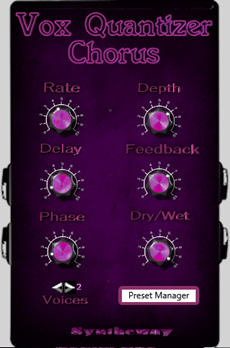
  • Rate: Sets the speed of the pitch modulation. Lower values produces a relaxed swirling. Higher values produces a stronger warbling, highly emphasized chorus sound.

  • Depth: Adjusts the depth of the pitch modulation.

  • Delay: Adjusts the minimum delay time of the delay line. This can provide subtle changes in the character of the effect.

  • Feedback: An extra smooth regeneration of delay. By increasing the amount of signal sent back through, the number of repeats is increased. Suitable for creating a soft flanger or a slight ambience effect.

  • Phase: Adjusts the phase difference between the left and right sinusoidal waveforms of low-frequency oscillators. Widens the sound image of the effect from mono to stereo. For maximum stereo spread, fully clockwise rotation. For a monophonic chorus, simply set to zero.

  • Voices: Sets the total number of voices used in the effect by switching to two or four delay line ‘taps’ or voices. Increasing the number of voices increases the fullness of the effect. For classic chorus sounds use two voices. For thick and full chorus effects use four voices.

  • Vocal Doubler / Voice Multiplier: Enhance a vocal track by doubling or multiplying vocals artificially, which adds richness and variety by switching the number of oscillator voices.
    The 'Doubler' preset uses two voices, instead the 'Multiplier' uses four voices option. A single mono vocal can struggle to stand out. Vocal Doubler and Voice Multiplier presets give listeners the impression of a stereo image are a reliable option. With a pair of headphones on, the vocal doubling or multiplying effects are better perceived. The original mono take is heard from the centre, the doubled or multiplied version spreads out across the stereo field.

  • Dry/Wet: sets the balance between the unprocessed (dry) signal and the processed (wet) signal that will be blended.

  • Preset Manager: 'Browser' to load and save presets and banks, enabling to export to *.fxp (VST2 Preset), *.fxb (VST2 Bank), *.vstpreset (VST3 Preset), *.aupreset (Audio Unit Preset) plus two generic formats (plain text): the *.xmlpreset (XML Preset) and the *.xmlbank (XML Bank), providing cross-platform presets/banks. This allows to control over the loading and saving of presets from disk as well as sharing presets between different plugin formats using the generic *.xmlpreset (XML Preset) and the *.xmlbank (XML Bank).

  • Hint property: Tooltip when the mouse is over a control. This will display a short description of what that control does.

  • 24 Presets included. Ability to create new and interesting chorus effects.

  • Preset List:


    #

    Preset

    1

    Bass Chorus

    2

    Bouncing Chorus

    3

    Bubbler Vibes

    4

    Choralizer

    5

    Chorused Vox

    6

    Detuning Voice

    7

    Lightweight Chorus

    8

    Lush Chorus

    9

    Panning Chorus

    10

    Quantized Voice

    11

     Quasi Leslie Speaker Cab

    12

    Shepard Tone

    13

    Spacious Chorus

    14

    Swirling Chorus

    15

    Swooshing Choruser

    16

    Thickener Chorus

    17

    Through Zero Chorus Flange

    18

    Unison Voice Clones

    19

    Vocal Doubler

    20

    Voice Multiplier

    21

     Warbling Chorus

    22

     Warm Chorus

    23

     Watery Chorus

    24

     Whirling Chorus


    Presets Sounds Demo ↓


    Vox Quantizer is a stereo Chorus effect that simulates several voices or instruments played at once by adding multiple short delays with a slight amount of feedback, making each voice or instrument sound distinct from the original. The effect varying between the left and right channels by offsetting the phase modulated by sinusoidal low-frequency oscillations.

    Before installing any VST, VST3 or Audio Units plug-ins, please make sure your computer meets the following requirements. Please test the demo version of this product extensively on your host to make sure there are no problems before purchasing.

     .dll (v2.4) and .vst3 (v3.6.7)

    • Windows operating system: Windows 11, Windows 10, Windows 8, Windows 8.1, Windows 7 64 bit.

    • VST and/or VST3 compatible host / digital audio workstation DAW / MIDI sequencer 64-bit: This VST/VST3 software can be "plugged" into any host application that supports VST/VST3 technology, such as Image-Line FL Studio, Steinberg Cubase Pro, Artist and Elements, Cakewalk by BandLab, Ableton Live, Cockos REAPER, PreSonus Studio One, Acoustica Mixcraft, MAGIX Acid Pro, MakeMusic Finale, Avid Sibelius, Mackie Tracktion, Steinberg Nuendo, Magix Samplitude, Magix Music Maker, Cantabile (Lite, Solo, Performer), n-Track Studio, VSTHost, DarkWave Studio, Bitwig, SAVIHost and many more.

    • MIDI controller device: A MIDI controller is required to play this VST instrument. The most common device in this class is a keyboard controller. After launching Digital Audio Workstation or your MIDI host application, be sure to select the appropriate MIDI device before attempting to play your MIDI controller.

    • An ASIO® sound card is recommended for low latency real-time performance.


    Limitations of the Unregistered/Demo Version: 

    Same sound effects quality than the full version. It generates a short beep in all output channels every 10 seconds. Be aware that certain features may not be available.

    The full version is available to purchase, as downloadable software, the price is US$ 24.90


    Make payments with PayPal - it's fast, free and secure!


    VST is a trademark of Steinberg Soft- und Hardware GmbH

    Audio Units™ is a trademark of Apple Inc.


  • Copyright © 2004-2026 Syntheway Virtual Musical Instruments.

    Privacy Policy | Disclaimer | FAQ | Site Map | Artists & LinksTechnical Support ContactAbout Us