|
|
| 
|
PreSonus
Studio One (macOS)
Enable VST Plug-ins Folder
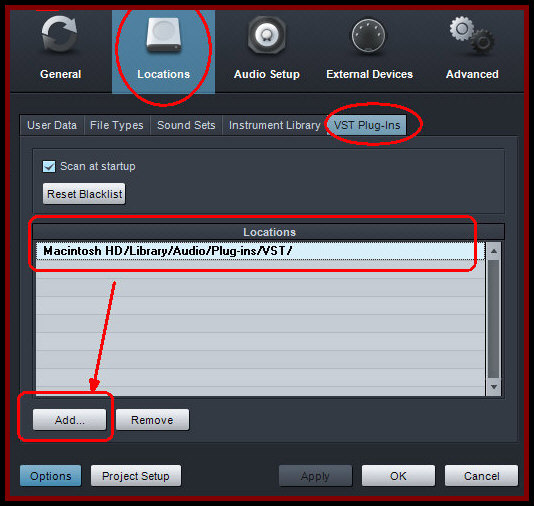
Preferences >
Options > Locations > VST Plug-ins:
-
Add Syntheway
.vst plugins manually by dragging and
dropping into VST and/or VST3 folder/s usually on:
Macintosh HD/Library/Audio/Plug-Ins/ VST/
Macintosh HD/Library/Audio/Plug-Ins/ VST3/
-
Navigate to the Studio One
> Preferences
> Options > Locations > VST Plug-ins
menu and click on the Add button, then
specify those location and click OK.
-
Click the
check-box "Scan at startup"
-
Reset
Blacklist if needed.
Alternatively, you can also drag-and-drop any
folder from the Explorer/Finder into the
Locations list. Studio One Pro will then scan
these locations at start-up, including searching
for new plug-ins you've added.
|
| |
|











