Access to Library folder and files in macOS
via Finder
You may need to access content in the user Library
folder to place the Syntheway plugins. The user
Library folder is hidden by default in macOS. Use
one of the following methods to make the user
Library content visible.
Method 1
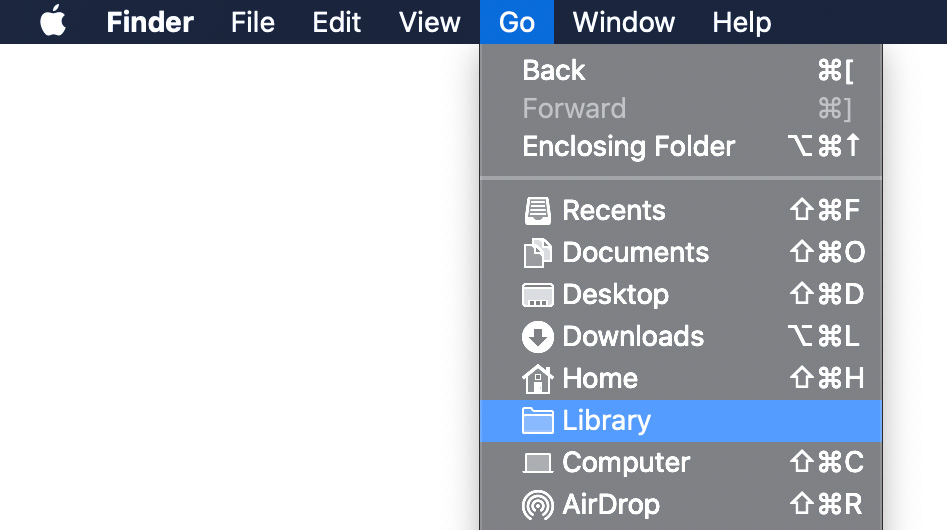
In the Finder, hold down the Option key
when using the Go menu. Library will
appear below the current user's home directory.
Note:
After you open the Library folder,
you can drag the Library icon
from the top of that window to the Dock,
sidebar, or toolbar to make it readily accessible.
Method 2
In the Finder, choose Go
> Go to Folder.
In the Go To Folder
dialog box, type ~/Library
Click Go.
macOS is a trademark of Apple Inc.
Audio Units™ is a trademark of Apple
Inc.
VST
is a trademark of Steinberg Soft- und Hardware GmbH
Kontakt is a trademark of
Native Instruments GmbH
Mac™ is a trademark of Apple Inc.,
registered in the U.S. and other countries.
EXS24
™
is a trademark of Apple
Inc., registered in the U.S. and other countries