|
|
| 
|
How To Access
Hidden Folders on Mac
'Macintosh
HD:/Users/[username]/Library' visible
Digital Audio Workstations
stores and writes important files into certain
folders which may be hidden by default on your
OS. In case you need to access these files, you
can do so using the following instructions:
Mac OS X 10.7
to macOS 10.12:
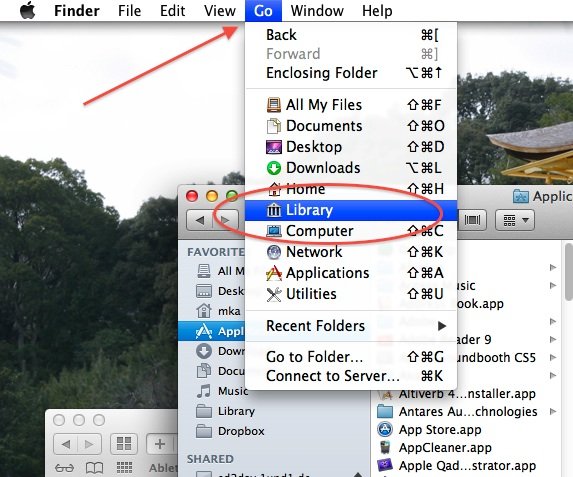
To make 'Macintosh HD:/Users/[username]/Library'
visible:
-
Open Finder
-
Click "Go" on the menu bar
-
Press and hold the “option/alt” key
-
Then click the "Library" shortcut which
appears
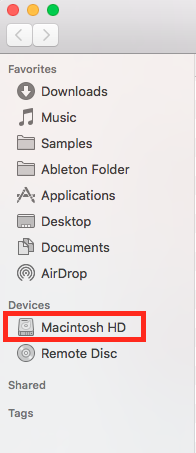
To access the top level of the Macintosh HD:
-
Open Finder
-
Click "Finder" on the menu bar, then
"Preferences"
-
Go to the "Sidebar" tab
-
Check "Hard disks" in the "Devices" section.
-
The "Macintosh HD" shortcut will now appear
on the sidebar in finder

| | |