Universal Audio
LUNA Recording System
Why are Audio Units plug-ins missing in LUNA?
The troubleshooting
suggestions below address these possibilities:
Audio Units Plug-In
Validation
Confirm that the
Audio Units plug-ins are installed and that they are showing up in your
Components folder. This can be verified by going to:
Mac
HD/Library/Audio/Plug-Ins/Components
Check for Audio
Units Plug-In Updates
Check with your
plug-in vendor to verify that the latest version of the plug-in is
installed, and that it is fully compatible with your operating system.
Restart your
computer if the installer requires a restart.
Record-Enabled
Tracks and Audio Units Plug-Ins
Audio Units plug-ins
will only populate in the plug-in drop down list when the track is not
record-enabled. Make sure the track that you are trying to insert the AU
plug-in onto is not record-enabled as shown below.
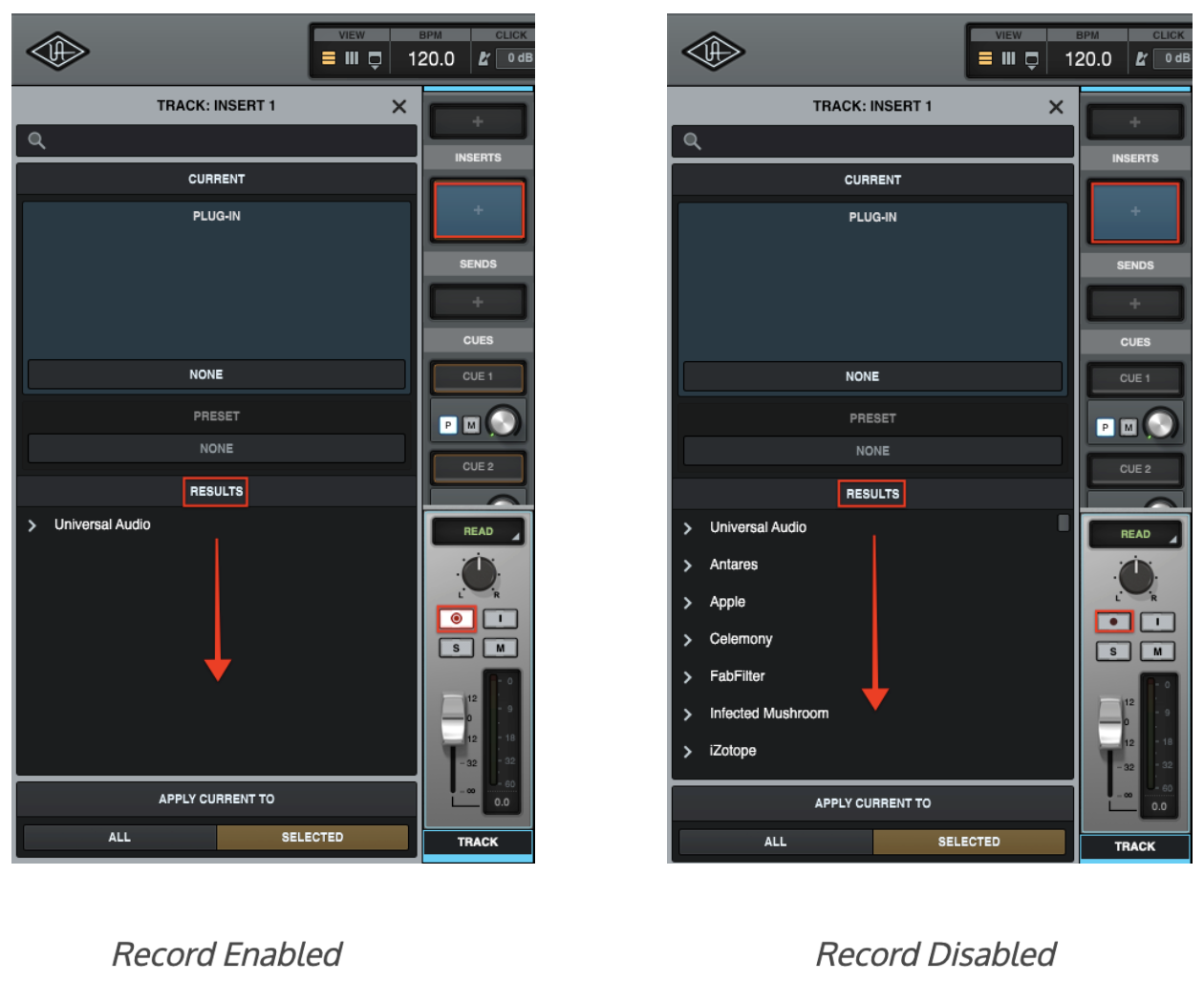
Supported Track
Formats in LUNA
At this time, LUNA
only supports mono-to-mono and stereo-to-stereo track formats. If you are
trying to use an Audio Units plug-in that only supports mono-to-stereo or
stereo-to-mono formats, such plug-ins will only show up on mono tracks or
stereo tracks.
The workaround for
mono-to-stereo issues would be to convert the mono track to a stereo track
(Track menu>Convert to Stereo), and then insert the AU plug-in on the stereo
track.
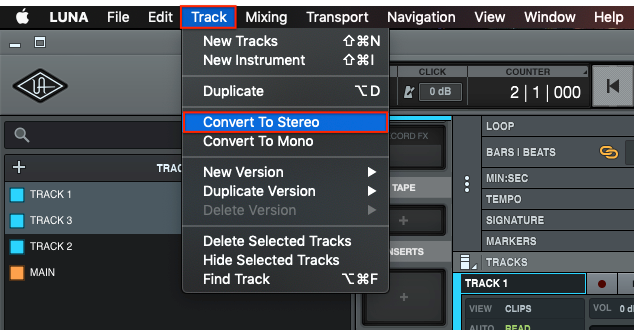
Convert to Stereo option in
Track menu
Resetting LUNA
Preferences
LUNA preference
files are used to save global LUNA system settings. To make sure these are
not corrupted, delete the files below from ~/Library .
Note: To access ~/Library (which is hidden by the OS), hold down
the Option key on your keyboard while accessing the Go menu in the macOS
Finder (in the Menu Bar at top of screen when Finder is in the foreground).
When Option is pressed, "Library" becomes visible in the menu so the hidden
location can be opened.
Folder: ~/Library/Application
Support/Universal Audio/workspace
File: AUPlug-Ins.json
Folder: ~/Library/Preferences
File: com.uaudio.luna.plist
Folder: ~/Library/Preferences/Universal Audio
File: LUNAprefs.json
Once deleted, empty
the Trash on your Mac, and re-launch LUNA.












