MIDI Cables &
Connectors
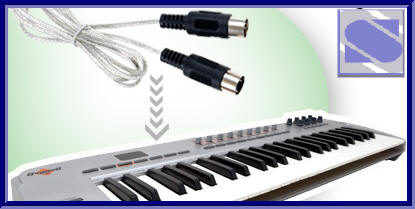
Many different "transports" can be used for MIDI messages. The
speed of the transport determines how much MIDI data can be
carried, and how quickly it will be received.
Each transport has its own performance characteristics which
might make some difference in specific applications, but in
general the transport is the least important part of MIDI , as
long as it allows you to connect all the devices you want use!
5-Pin MIDI DIN
Using a 5-pin "DIN" connector, the MIDI DIN transport was
developed back in 1983, so it is slow compared to common
high-speed digital transports available today, like USB,
FireWire, and Ethernet. But MIDI-DIN is almost always still
used on most MIDI-equipped devices because it adequately
handles communication speed for one device. IF you want to
connect one MIDI device to another (not a computer), MIDI
cables are still the best way to go.
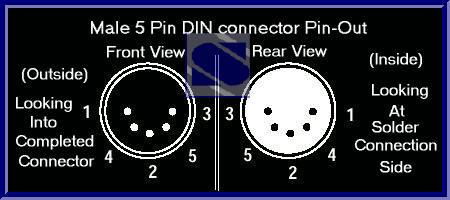
It used to be that connecting a MIDI device to a computer
meant installing a "sound card" or "MIDI interface" in order
to have a MIDI DIN connector on the computer. Because of space
limitations, most such cards did not have actual 5-Pin DIN
connectors on the card, but provided a special cable with
5-Pin DINs (In and Out) on one end (often connected to the
"joystick port"). All such cards need "driver" software to
make the MIDI connection work, but there are a few standards
that companies follow, including "MPU-401" and "SoundBlaster".
Even with those standards, however, making MIDI work could be
a major task.
Over a number of years the components of the typical sound
card and MIDI interface (including the joystick port) became
standard on the motherboard of most PCs, but this did not make
configuring them any easier.
Serial, Parallel, and Joystick Ports
Before USB and FireWire, personal computers were all generally
equipped with serial, parallel, and (possibly) joystick ports,
all of which have been used for connecting MIDI-equipped
instruments (through special adapters). Though not always
faster than MIDI-DIN, these connectors were already available
on computers and that made them an economical alternative to
add-on cards, with the added benefit that in general they
already worked and did not need special configuration.
The High Speed Serial Ports such as the "mini-DIN" ports
available on early Macintosh computers support communication
speeds roughly 20 times faster than MIDI-DIN, making it also
possible for companies to develop and market "multiport" MIDI
interfaces that allowed connecting multiple MIDI-DINs to one
computer. In this manner it became possible to have the
computer address many different MIDI-equipped devices at the
same time. Recent multi-port MIDI interfaces use even faster
USB or FireWire ports to connect to the computer.
USB and FireWire
All recent computers are equipped with either USB and/or
FireWire connectors, and these are now the most common means
of connecting MIDI devices to computers (using appropriate
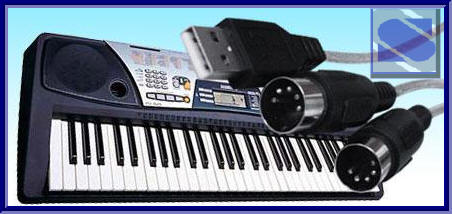
format adapters). Adapters can be as simple as a short cable
with USB on one end and MIDI DIN on the other, or as complex
as a 19 inch rack mountable CPU with dozens of MIDI and Audio
In and Out ports. The best part is that USB and FireWire are
"plug-and-play" interfaces which means they generally
configure themselves. In most cases, all you need to do is
plug in your USB or FireWire MIDI interface and boot up some
MIDI software and off you go.
Current USB technology generally supports communication
between a host (PC) and a device, so it is not possible to
connect to USB devices to each other as it is with two MIDI
DIN devices. (This may change sometime in the future with new
versions of USB). Since communications all go through the PC,
any two USB MIDI devices can use different schemes for packing
up MIDI messages and sending them over USB... the USB device's
driver on the host knows how that device does it, and will
convert the MIDI messages from USB back to MIDI at the host.
That way all USB MIDI devices can talk to each other (through
the host) without needing to follow one specification for how
they send MIDI data over USB.
Most FireWire MIDI devices also connect directly to a PC with
a host device driver and so can talk to other FireWire MIDI
devices even if they use a proprietary method for formatting
their MIDI data. But FireWire supports "peer-to-peer"
connections, so MMA has produced a specification for MIDI
over IEEE-1394 (FireWire),
which is available for download on this site (and incorporated
in IEC-61883 part 5).
Ethernet
If you are connecting a number of MIDI instruments to one or
more computers, using Ethernet seems like a great solution. In
the MIDI industry there is not yet agreement on the market
desire for MIDI over Ethernet, nor on the net value of the
benefits vs. challenges of using Ethernet, and so there is
currently no MMA standard for MIDI over Ethernet.
However, other Standard Setting Organizations have
specifications for MIDI Over Ethernet, and we think it
appropriate that people know about those solutions. There are
also proprietary solutions for MIDI Over Ethernet, but because
they are not open standards they are not appropriate for
discussion by MMA.
The IETF
RTP Payload Format for MIDI solution
has received extensive modification in response to comments
by MMA-members, and is also the foundation of Apple's own
MIDI Over Ethernet solution. Though neither solution has
been officially adopted or endorsed in any way by MMA, both
technologies have stood up to MMA member scrutiny and so are
likely to appear (in one manner or another) in future MIDI
hardware and/or software products.
For the past several years, the IEEE has been developing
protocols for low-latency audio and video transport over
Ethernet with high quality of service. These protocols are
known as Audio/Video Bridging, or AVB, and are part of the
larger IEEE 802.1 Working Group, which develops networking
standards that enable interoperability of such ubiquitous
devices as Ethernet switches. The AVB protocols provide
precision time synchronization and stream bandwidth
reservation at the network level.