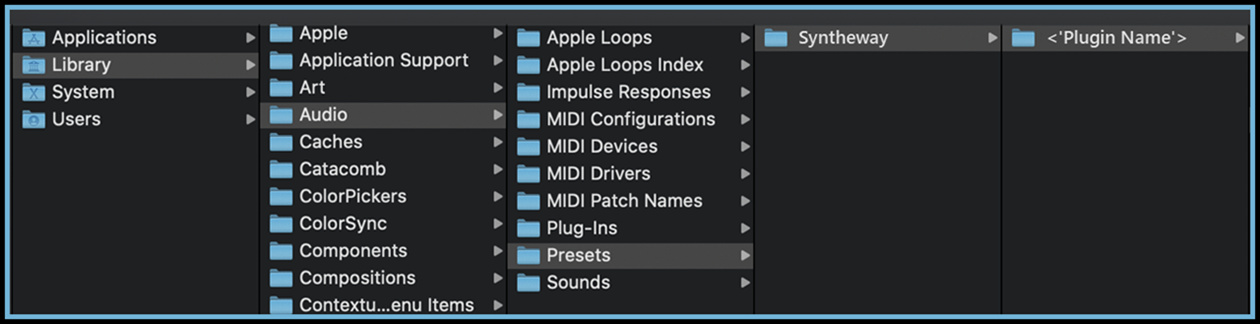
Syntheway Audio Units Presets (.aupreset) Location - File Path /Library/Audio/Presets
Audio Units Presets (.aupreset) Location

Menu

  Home

Syntheway Audio Units Presets (.aupreset)


Location - File Path /Library/Audio/Presets


Syntheway Presets (.aupreset format) for Waverator Spectra, Synthractive, Astra Turbo Quasar, Harmodion, Spherator FM, Phasewaver. Alphatron Oscillion, Stepattern Step Sequencer and Audio Effects (AcouVerb Reverb, Sonicirtuit Flanger, ClonEchoes Delay, Chromacycle Phaser, Echo Chamber, Overdriverb, Vox Quantizer Chorus, EQuanaut and AmpVibe Rotary Speaker) must be stored on disk in one of these three locations with the extension .aupreset:

 

  • User Domain:    ~/Library/Audio/Presets/

  • Local Domain:    /Library/Audio/Presets/


Audio Unit Presets (.aupreset)

Audio Unit Presets Handling: The Syntheway preset folder (with *.aupreset files) should be placed manually.

Every Audio Unit preset is represented by a unique .aupreset file and stored under:

[Home]/Library/Audio/Presets/[manufacturer]/[plug-in]/

Macintosh HD/Library/Audio/Presets

Macintosh HD/Users/YourUserName/Library/Audio/Presets

Just move the ‘Syntheway’ folder inside the following path:

Mac System:

Macintosh HD/Library/Audio/Presets/

User:

Macintosh HD/Users/YourUserName/Library/Audio/Presets/

(that means either in your user home Library or the root Library)


After that, the complete path will look like the following:

Mac System:

Macintosh HD/Library/Audio/Presets/Syntheway/[Plugin Name]

User:

Macintosh HD/Users/YourUserName/Library/Audio/Presets/Syntheway/[Plugin Name]


Copyright © 2004-2026 Syntheway Virtual Musical Instruments.

Privacy Policy | Disclaimer | FAQ | Site Map | Artists & Links | Technical Support | Contact | About Us