|
|
| 
|
|
Open Ableton Live with Rosetta 2 in Mac computers with Apple silicon
Syntheway has upgrated most of its catalog for macOS with Apple
Silicon support in a major update .
These
Audio Units, VST and VST3 plug-ins are now available as
Universal 2 binaries
that work on Intel Macs as well as natively on Apple Silicon Macs.
Currently, the
Audio
Effects
and the
Software Synthesizers
plug-ins are available for
Mac Intel processors or Apple silicon (M1, M2, M3, M4) in
Rosetta 2
mode.
Rosetta
2 enables a Mac with Apple silicon to use Audio Units (AU), VST and VST3
plugins built for a Mac with an Intel processor.
Please follow the steps below to open Ableton Live with
Rosetta:
To use
VST2 and VST3 plug-ins not yet updated/compiled for Silicon on an Apple
Silicon Mac, you can force Live to run as an Intel application via Rosetta
2, as explained below:
1.- Find
and select Live 11 in your Applications folder.
2.- Press Command-I, or right-click / access the File menu, and select "Get
Info."
3.- In the Info window that opens, check the box for �Open using Rosetta"
4.- Close the Info window and re-launch Live.
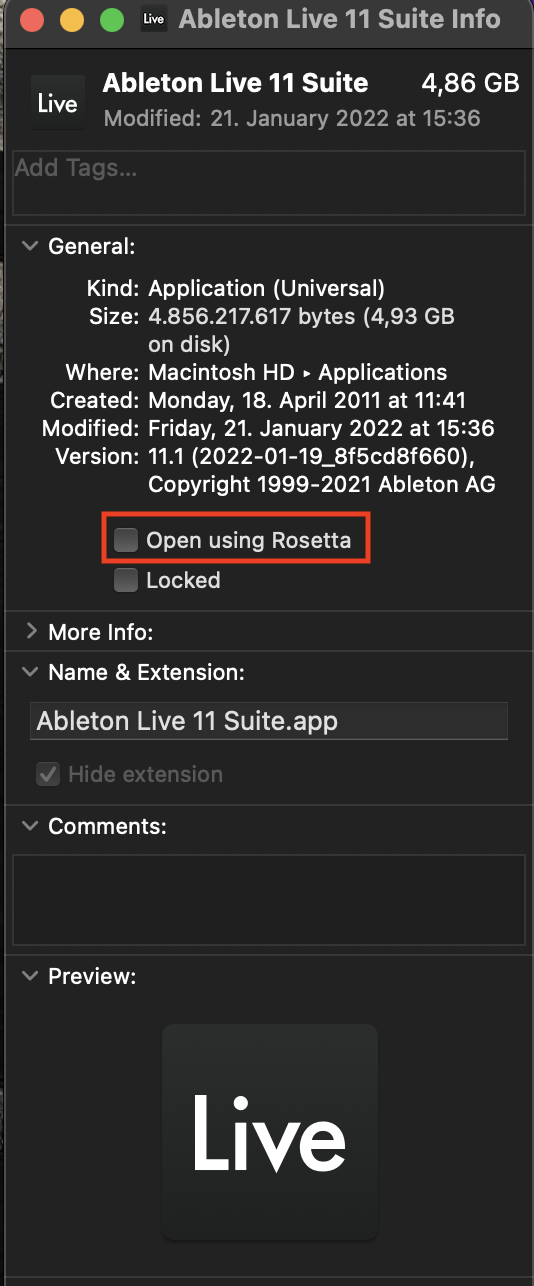
To
enable Rosetta 2 option with another DAW (Logic,
etc.), locate the Applications folder.
Right click it, and select "Get Info" or use the Key command ⌘+I. This
temporary fix will allow you to continue using AU/VST/VST3 Plugins until
completion of integration development.
Audio Units� is a trademark of Apple
Inc.
VST
is a trademark of Steinberg Soft- und Hardware GmbH
Mac� is a trademark of Apple Inc.,
registered in the U.S. and other countries.
macOS is a trademark of Apple Inc.,
registered in the United States and other countries
|
| |
|